Knowledge and support 6 min read Apr 30, 2026

Use Knowledge Base Citations in WooCommerce Support Replies

Ask SophMate for support replies that cite Knowledge Base items, separate policy facts from suggestions, and keep customer-facing answers reviewable.
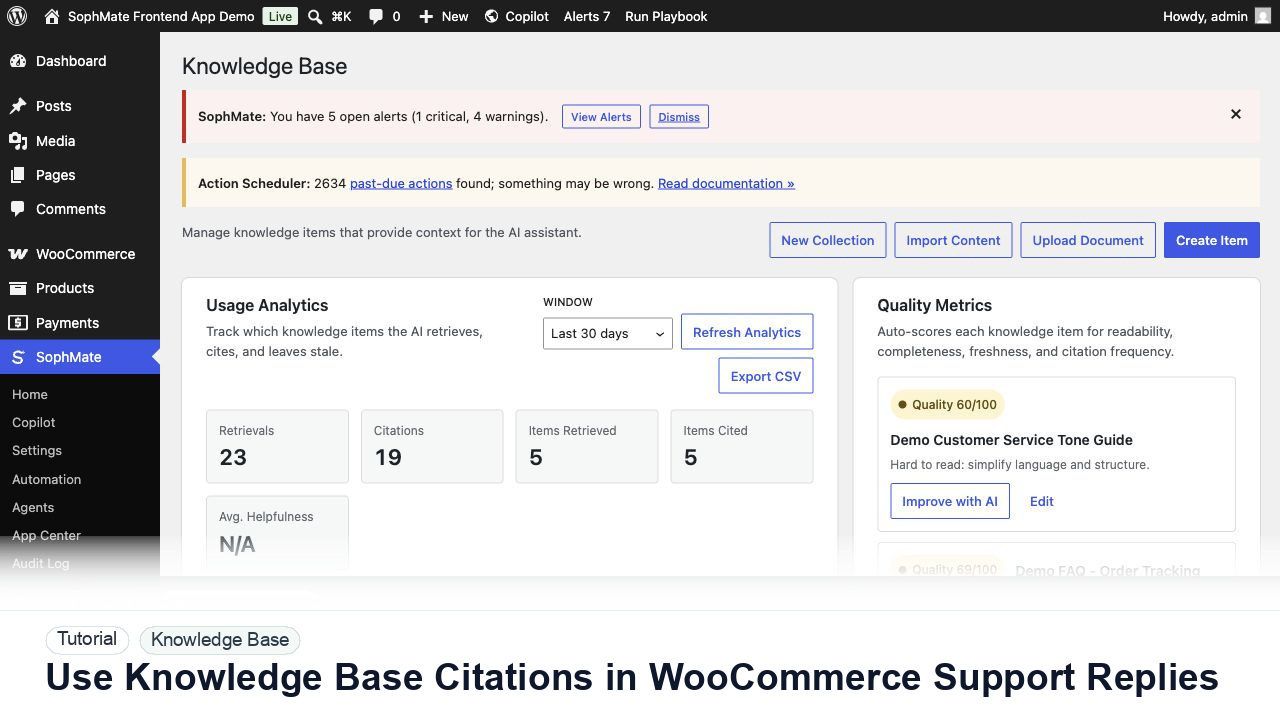
SophMate tutorial image for Use Knowledge Base Citations in WooCommerce Support Replies showing the related wp-admin workflow context.

Outcome

By the end of this tutorial, you will know how to use SophMate for AI support citations while keeping the work reviewable inside WordPress.

Scenario

A support lead wants every AI-drafted return or shipping reply to show the policy source that shaped the answer.

Buyer evaluation note

Use this tutorial to evaluate whether SophMate can answer from approved business sources instead of generic AI memory. Buyers should look for source ownership, sync quality, citation checks, stale-content handling, and policy-review cadence.

When not to use this workflow

  • Do not rely on Knowledge Base output when source material is stale, duplicated, conflicting, or missing an owner.
  • Do not import private tickets, legal correspondence, credentials, or unreviewed drafts as general support sources.
  • Do not use this workflow to bypass the normal owner, reviewer, or approval path for production changes.
  • Defer the workflow when the source data, permission boundary, rollback owner, or customer impact cannot be explained.

Example operator request

Draft an answer using only current Knowledge Base sources. Show the cited source, identify stale or conflicting policy text, and suggest source edits instead of guessing.

What the image shows

The tutorial image shows Knowledge Base collections, quality signals, usage analytics, and policy items because cited answers depend on the quality of source material.

Before you begin

  • Confirm the source policy, FAQ, procedure, tone guide, or product fact has a named owner and a current review date.
  • Remove drafts, secrets, private tickets, legal correspondence, and conflicting policy text before using the source in answers.
  • Confirm SophMate is active, diagnostics do not show blocking failures, and the current user role can open the relevant SophMate module.
  • Check provider, budget, privacy, and approval settings before asking SophMate to draft or execute work.
  • Keep customer data, API keys, purchase codes, and private credentials out of prompts unless this workflow explicitly requires and permits that context.

Access and data boundary

  • Use approved source pages, policies, FAQs, and tone guides with named owners and review dates.
  • Do not import stale drafts, private customer tickets, legal correspondence, credentials, or internal-only incident notes as general Knowledge Base material.
  • Use the least-privileged SophMate role that can complete the review, and keep administrator-only access limited to setup, provider, billing, diagnostics, and high-risk approval work.
  • Prefer record IDs, short excerpts, and redacted screenshots over full customer records, payment details, provider keys, purchase codes, or raw server logs.

Guardrail

If SophMate cannot cite a current source, improve the Knowledge Base item before relying on the answer.

Common mistakes to avoid

  • Importing outdated policy drafts or duplicate pages.
  • Trusting an answer because it sounds confident even when it cites the wrong source.
  • Fixing prompts repeatedly instead of improving weak Knowledge Base content.

Step 1: Ask for citation-first output

Prompt SophMate to list the source items it used before drafting the reply. This helps reviewers spot missing or stale context.

Step 2: Request a customer-ready draft

Ask for a concise reply in the brand tone, but require the draft to avoid promises that are not present in the cited policy.

Step 3: Review the citation and wording together

A citation is not enough if the wording adds extra guarantees. Compare the answer with the source item.

Step 4: Save recurring patterns

If the same support scenario repeats, turn the prompt into a playbook so the source and tone instructions stay consistent.

Step 5: Improve weak sources

When SophMate cannot answer clearly, update the Knowledge Base item with better headings, examples, or policy details.

Review checklist

  • The answer names the source item.
  • No unsupported promises are added.
  • Repeated scenarios become playbooks.

Production readiness

  • Check source freshness, citation quality, collection ownership, and policy approval before relying on generated answers.
  • Run at least one citation test against a real support question before using the workflow with customers.
  • Run the workflow first on a narrow, low-risk record or page before expanding scope.
  • Confirm the reviewer, approval rule, and evidence location before any production-changing action runs.

Failure modes to test

  • Test stale sources, duplicate policies, missing citations, conflicting source items, and unsupported support questions.
  • Confirm weak answers lead to source correction rather than prompt workarounds.
  • Test the path where the user lacks permission, required context is missing, or the reviewer rejects the result.
  • Confirm the failed state leaves an audit record, visible owner, and clear next action instead of a silent or ambiguous outcome.

Success signal

The Knowledge Base workflow is successful when Copilot or an agent cites the expected source, the answer matches the current policy, and weak source material is improved instead of hidden by prompting.

Post-run monitoring

  • Review citations, stale-source warnings, answer corrections, and support-user feedback after the first real questions.
  • Track which source pages need ownership or rewrite before broader support use.
  • Review the audit log, diagnostics, and affected WordPress records shortly after the first run.
  • Record any confusing output, missing source context, permission issue, cost spike, or reviewer correction before repeating the workflow.

Safe expansion criteria

  • Sources are current, citations match policy, and support owners know how to correct weak answers.
  • At least one real support scenario has passed citation and reviewer checks.
  • The first run has a documented owner, evidence, review result, and stop path.
  • A second operator can repeat the workflow from the notes without relying on hidden context.

Rollback or stop path

If citations are stale or wrong, stop using the answer, update the source item, rerun sync or reindexing, and retest before support teams rely on it.

What to document

Document source page, collection, sync mode, quality notes, citation test, and any policy owner who must approve future changes.

Owner and cadence

A support lead or policy owner should review Knowledge Base workflows after policy changes and during regular support-quality review.

Escalate when

Escalate when policy ownership is unclear, citations point to stale sources, or agents depend on content that no team member can approve.

Common questions

What if SophMate gives an answer without the citation I expected?

Stop and inspect the source material. Missing or weak citations usually mean the Knowledge Base item needs clearer headings, fresher policy text, or a narrower collection.

Does this workflow remove the need for human review?

No. SophMate should make the work easier to draft, inspect, approve, and repeat. Human review remains necessary when output affects customers, money, published content, privacy, settings, or workflow execution.

What should be documented before expanding the workflow?

Record the owner, input scope, access boundary, approval point, failure modes tested, evidence location, monitoring window, and rollback or stop path.

Next action

Run one citation test against the approved source, revise the Knowledge Base item if the answer is weak, and only then let Copilot or agents rely on it.

Next step

Bring this workflow into your WordPress site

Review the SophMate listing for current package details, screenshots, compatibility notes, and license terms.

View on CodeCanyon

Related

More from Knowledge and support

Pro