What Tools Registry does
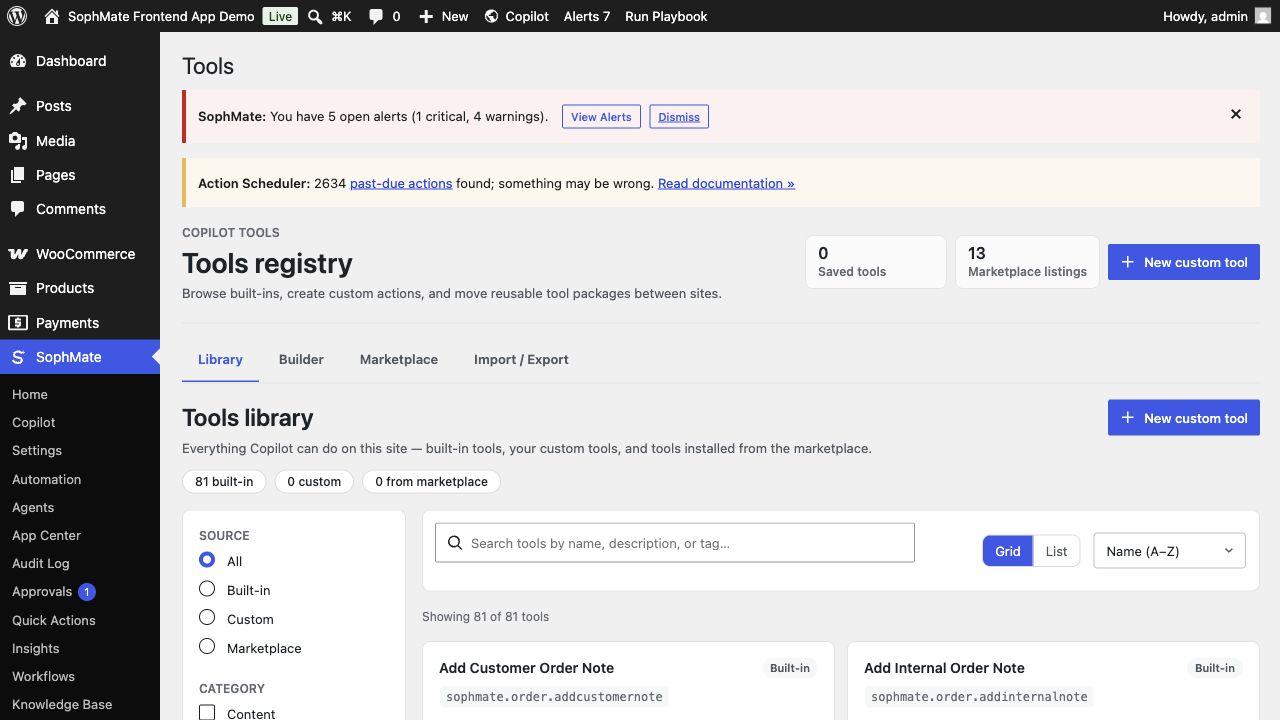
Define, test, import, and export tools for commerce, content, analytics, settings, users, system, and context workflows with categories, risk levels, and visibility controls.
SophMate is built for WordPress and WooCommerce teams that want useful AI help without turning the site into an invisible automation box. The module keeps the work close to wp-admin, where products, orders, pages, policies, users, and operational history can be reviewed by the people responsible for the site.
Best-fit teams
- Developers exposing custom REST, WP-CLI, SQL read, webhook, or context tools to SophMate in a controlled registry.
- Operations owners who need to understand which tools are read-only, write-capable, agent-visible, or approval-gated before rollout.
- Teams that want WordPress-native context, permission checks, and audit history instead of a disconnected AI workspace.
- Buyers evaluating whether the module can fit a real operating process, not only produce an impressive demo response.
What teams see in wp-admin
The Tools Registry lists built-in and custom tools by category, type, schema, visibility, and risk. This is where a team decides whether a tool should be read-only, approval-gated, hidden from agents, or safe for repeatable use.
Best-fit jobs
- Add a read-only analytics tool for a custom table.
- Build a webhook trigger for a shipping provider.
- Classify high-risk tools so approvals remain mandatory.
Product capabilities
- Built-in and custom tools
- REST, WP-CLI, SQL read, and webhook types
- Risk classification
- Schema preview
- Import and marketplace tabs
Setup prerequisites
- Document each tool type, schema, permission boundary, risk level, validation behavior, and audit output before making it visible.
- Test custom tools with realistic failures and malformed inputs before agents or workflows can call them.
- Set provider budgets and role access before giving users a workflow that can become a site-changing plan.
- Keep staging, backup, or rollback expectations clear whenever the feature can affect public content, commerce data, customer messages, or theme output.
Operating notes
Start with a low-risk example, check the visible output, and promote the pattern only after the team can explain the inputs, review point, owner, and rollback path.
Rollout checklist
- Register read-only tools first, inspect validation and audit output, then add write-capable tools behind approvals.
- Review every new tool from the perspective of the agent, workflow, and human approver that may call it.
- Name the owner of the first rollout window and schedule a review before making the feature a default team habit.
- Capture what changed during the first run so future administrators can distinguish setup mistakes from product behavior.
Risks and guardrails
- Risk: a custom tool can expose privileged data or write too broadly. Guardrail: validate schemas, permissions, risk level, and approval gating.
- Risk: agents may call a tool in unexpected sequences. Guardrail: test error cases, malformed inputs, and audit output.
- Treat convenience as a rollout risk whenever the feature can write data, contact customers, publish content, or change the storefront.
- Keep permissions, budgets, audit review, and rollback expectations visible during the first production use.
When to use a different path
Do not expose a custom tool to agents or workflows until its schema, permissions, risk level, and audit output have been tested with real examples.
How it stays governed
The important pattern is draft, review, approve, then execute. Read-only questions can stay conversational. Work that affects products, coupons, content, customers, workflows, images, or settings should move through a reviewed plan, workflow run, or publishing step. That is why Tools Registry belongs beside approval-based action plans, audit and diagnostics controls, and the broader SophMate tutorial library.
Evidence to capture
- Capture schema, example inputs, validation errors, permission checks, risk classification, audit fields, and approval behavior.
- Save failing tool tests because they reveal whether agents and workflows will handle real operating conditions safely.
- Link evidence to the relevant docs, tutorials, or use case when the feature becomes part of a repeatable operating procedure.
- Keep evidence concise enough for support and governance review; avoid exporting secrets or unnecessary customer data.
What to measure after rollout
Measure validation failures, rejected tool calls, audit completeness, and whether high-risk tools remain approval-gated.
Decision record
- Record each tool risk level, visibility, schema owner, approval requirement, and permitted caller types.
- Write down the first production scenario, the reviewer, and the evidence that would prove the rollout is working.
- Revisit the decision after the first incident, failed run, support ticket, or policy change rather than letting the original setup become permanent by accident.
Where to go next
Compare this module against the rest of the SophMate feature library, map it to a team scenario in use cases, or start with a practical guide from SophMate tutorials.